Astro SEO: sitemap, meta tags and structured data
By Michael Nefedov, noetio · Updated 21 October 2026
Astro SEO starts from static HTML, which Astro builds by default: you set a site URL, add the sitemap integration, and put the right tags in one layout.
Short answer
- Set site in
astro.config.mjs. Sitemap and canonical URLs depend on it. - Run
npx astro add sitemap. Put title, canonical, Open Graph and JSON-LD in one layout. - Every sample was built on Astro 7.4.1 and @astrojs/sitemap 3.7.4, on 21 October 2026.
Astro SEO step 1: set your site URL and static output
Set site in your config and keep static output. Astro uses site to build your sitemap and canonical URLs, and says setting it is strongly recommended (docs). The default output is "static", which prerenders all pages. Keep it for content pages.
astro.config.mjs
import { defineConfig } from "astro/config";
import sitemap from "@astrojs/sitemap";

export default defineConfig({
  site: "https://example.com",
  integrations: [sitemap()],
});
Install with npx astro add sitemap, or add the package by hand as shown in the integration docs. A build now creates sitemap-index.xml and sitemap-0.xml.
In our build, the URLs in the sitemap had a trailing slash (https://example.com/pricing/) and no lastmod.
Sitemap options that matter
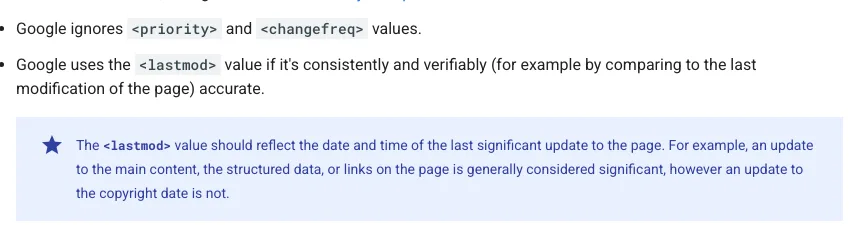
Use filter to drop pages, and ignore priority and changefreq.
astro.config.mjs
sitemap({
  filter: (page) => !page.includes("/thank-you"),
  serialize(item) {
    // Google ignores priority and changefreq. Add lastmod only if you know the real date.
    return item;
  },
})filterremoves pages you do not want listed.- Google ignores
priorityandchangefreqand useslastmodonly when it is consistently accurate (Google). - We built this config with both options and it worked.
- The docs warn that SSR dynamic routes are not listed, so prerender what you want indexed.

Then point crawlers at it. In public/robots.txt:
public/robots.txt
User-agent: *
Allow: /

Sitemap: https://example.com/sitemap-index.xml
A layout with meta tags
Make one layout and use it for every page. Astro.site comes from your config, so the canonical is always a full URL. If you forget site, this layout fails the build. We removed site and got TypeError: Invalid URL while rendering a page.
src/layouts/Base.astro
---
interface Props {
  title: string;
  description: string;
  image?: string;
}
const { title, description, image = "/og-default.png" } = Astro.props;
const canonical = new URL(Astro.url.pathname, Astro.site).href;
const ogImage = new URL(image, Astro.site).href;
---
<html lang="en">
  <head>
    <meta charset="utf-8" />
    <meta name="viewport" content="width=device-width" />
    <title>{title}</title>
    <meta name="description" content={description} />
    <link rel="canonical" href={canonical} />
    <link rel="sitemap" href="/sitemap-index.xml" />
    <meta property="og:type" content="website" />
    <meta property="og:title" content={title} />
    <meta property="og:description" content={description} />
    <meta property="og:url" content={canonical} />
    <meta property="og:image" content={ogImage} />
    <meta name="twitter:card" content="summary_large_image" />
    <slot name="head" />
  </head>
  <body>
    <slot />
  </body>
</html>
Use it in a page and pass a unique title and description. Write a title and description that fit that page only:
src/pages/pricing.astro
---
import Base from "../layouts/Base.astro";
---
<Base title="Pricing for Example: Plans and Limits" description="Example pricing: what each plan costs and what it includes.">
  <h1>Pricing for Example</h1>
</Base>
Structured data (JSON-LD)
Add JSON-LD with set:html on an object you build yourself. Astro does not escape HTML in set:html, so only pass values you trust (docs). For a JSON-LD block that is fine, because you build the object yourself. Add this inside the layout's head, or in a page through the head slot:

src/pages/blog/my-post.astro
---
import Base from "../../layouts/Base.astro";
const jsonLd = {
  "@context": "https://schema.org",
  "@type": "Article",
  headline: "My post title",
  datePublished: "2026-10-20",
  author: { "@type": "Person", name: "Your Name" },
};
---
<Base title="My post title" description="One sentence summary.">
  <script slot="head" type="application/ld+json" set:html={JSON.stringify(jsonLd)} />
  <h1>My post title</h1>
</Base>
If any value comes from users, replace < with \u003cin the string first. Test the page in Google's Rich Results Test.
Blog pages from content collections
Keep posts as Markdown in a collection and build one static page per post. This is the pattern from the Astro docs (content collections). First define the collection.
The page code below needs this file, or getCollection("blog") has nothing to read. Without it the build does not fail. On a clean install we got only [WARN] The collection "blog" does not exist or is empty, the build exited with success, and the post pages were silently not built:
src/content.config.ts
import { defineCollection } from "astro:content";
import { glob } from "astro/loaders";
import { z } from "astro/zod";

const blog = defineCollection({
  loader: glob({ pattern: "**/*.md", base: "./src/content/blog" }),
  schema: z.object({
    title: z.string(),
    description: z.string(),
  }),
});

export const collections = { blog };
Posts go in src/content/blog/, each with title and description in its front matter. Then the page. The sitemap integration lists every post it builds:
src/pages/blog/[id].astro
---
import { getCollection, render } from "astro:content";
import Base from "../../layouts/Base.astro";

export async function getStaticPaths() {
  const posts = await getCollection("blog");
  return posts.map((post) => ({ params: { id: post.id }, props: { post } }));
}

const { post } = Astro.props;
const { Content } = await render(post);
---
<Base title={post.data.title} description={post.data.description}>
  <h1>{post.data.title}</h1>
  <Content />
</Base>
The schema above makes both fields required. We added a post with a title but no description, and astro build stopped with InvalidContentEntryDataErrorand “description: Required”. A missing description fails the build instead of reaching search.
With the post in place, the build wrote /blog/hi/index.html with the post's H1.
Redirects: a catch on static sites
On a static site, an Astro redirect is a meta refresh, not a 301.
astro.config.mjs
export default defineConfig({
  redirects: { "/old-page": "/new-page" },
});
The Astro docs say that a static site with no adapter produces a client redirect with a <meta http-equiv="refresh"> tag, which does not support status codes. Status codes work with SSR, or with a static adapter in static mode.

For the config above, our build wrote dist/old-page/index.html with this head:
dist/old-page/index.html (build output)
<title>Redirecting to: /new-page</title>
<meta http-equiv="refresh" content="0;url=/new-page">
<meta name="robots" content="noindex">
<link rel="canonical" href="https://example.com/new-page">
So the old page carries a canonical pointing to the new page, and a noindex. In a test project with a real /new-page, the sitemap listed /new-page/ and not /old-page/.
Google's redirect page lists “meta refresh (0 seconds)” as a permanent redirect type, but says a server-side redirect has the highest chance of being read correctly (Google). If you need a real 301 or 308, set it in your host's redirect rules or add an adapter, and check key URLs in URL Inspection after a move.

Check what crawlers get
Build, then curl your own site and read the first HTML.
terminal
npm run build
curl -s https://example.com/ | grep -E "<title>|canonical|<h1"
curl -s https://example.com/sitemap-index.xml
In static output the title, canonical and H1 are in the first HTML. That is the safe setup: Google says pre-rendering is a great idea because not all bots run JavaScript (Google).

We also tested islands. In a page with one React component rendered with client:only="react" and one with client:load, the built HTML had the text of the client:load one only. So the client:only island had no rendered text in the HTML.
Its props, including a label string, were in the props attribute of the astro-island tag, which is not visible page text. This is our test, not a quote from the directives reference. Keep text you want ranked out of those.
Common Astro SEO mistakes
Six mistakes cause most Astro SEO problems.
- No
sitein config. With the layout above, the build fails withTypeError: Invalid URL. Astro's docs also usesitefor the sitemap. - Trailing slash mismatch. In our static build both the canonical and the sitemap used
/pricing/, so they matched. Check that yours do too. ThetrailingSlashoption defaults to"ignore"and affects the dev server and on-demand pages, so check your host as well. - Switching to SSR and losing sitemap entries. The docs say dynamic SSR routes are not listed.
- Main text inside
client:onlycomponents. It is missing from the HTML. - One title for all pages. Pass title and description as props from each page.
- Forgetting robots.txt after launch. Add the Sitemap line, then submit the sitemap in Search Console.
Astro SEO checklist
Tick these eight items before you launch.
- 1site set in astro.config.mjs
- 2output left as static for content pages
- 3sitemap integration installed, sitemap-index.xml opens
- 4One layout with title, description, canonical, Open Graph
- 5Unique title and description per page
- 6JSON-LD on articles and the home page
- 7robots.txt with the Sitemap line
- 8Sitemap submitted in Search Console
After the code: submit the site to Google Search Console. On Next.js instead? See Next.js SEO.
Sources
All read on 21 October 2026. Our build outputs above come from Astro 7.4.1 and @astrojs/sitemap 3.7.4, rebuilt on 21 October 2026; versions from npm view astro version and npm view @astrojs/sitemap version.
- @astrojs/sitemap, Astro Docs
- Configuration reference, Astro Docs
- Template directives reference, Astro Docs
- Content collections, Astro Docs
- Build and submit a sitemap, Google Search Central, last updated 8 July 2026
- Redirects and Google Search, Google Search Central, last updated 14 April 2026
- Understand the JavaScript SEO basics, Google Search Central, last updated 4 March 2026
Questions
Yes. Astro builds static HTML by default, so crawlers get your full content in the first response, with no JavaScript needed.
Not for dynamic routes. The Astro docs say the integration cannot generate sitemap entries for dynamic routes in SSR mode. Prerendered pages are fine. The docs describe customPages as a way to add pages that are on your deployed site but not created by Astro. We did not test it with SSR routes.
Not for the basics in this guide. The layout and sitemap samples use only the official sitemap integration and one layout, and the build output had the title, canonical, Open Graph tags, JSON-LD and a sitemap.
Astro 7.4.1 and @astrojs/sitemap 3.7.4, the latest on npm on 21 October 2026. Newer versions may behave differently, so run the curl step above on your own build.
More guides
- Next.js SEO: Metadata, Sitemap and JSON-LD Guide (2026)
- Lovable SEO: What Crawlers Get From Your App (2026)
- SEO for Single Page Application: Google, AI Bots, Fixes
Turn your next topic into a useful page
Compass reads your website, helps you plan relevant topics and creates sourced article drafts. Review and approve the work, then send it to a connected CMS or export it.
Written by Michael Nefedov, founder of noetio. Updated 21 October 2026.