ChatGPT for SEO: 9 prompts to copy and what to check
By Michael Nefedov, noetio · Updated 20 October 2026
ChatGPT for SEO works well for grouping keywords, outlining pages and drafting titles, and badly for anything that needs real data, like volumes, rankings or what is on your live page.
Short answer
- Use it for language work: clusters, briefs, titles, FAQs, schema drafts.
- Do not trust the numbers and facts it writes from memory: volume, difficulty, rankings, statistics, competitor claims.
- Paste your real data into the prompt. Then check every output against a source.
What ChatGPT is good and bad at in SEO
It is good at language work and bad at numbers.
| Task | Fit | Why |
|---|---|---|
| Keyword clustering | Good | Grouping by meaning is language work. You supply the list. |
| Content briefs | Good | Outlines and questions. Check them against the real results page. |
| Titles and meta | Good | Many variants quickly. You pick one and check it says what the page says. |
| Schema drafts | Okay | You supply the facts. Run a validator, and compare the text to the visible page. |
| Audits | Weak | Without search on, it only reads what you paste. Index status comes from Search Console. |
| Volume, difficulty, rankings | Bad | Numbers it writes from memory are guesses. Take them from Search Console or a keyword tool. |
9 ChatGPT prompts for SEO you can copy
Each prompt below works as written once you replace the text in [brackets]. Paste real data where a prompt asks for it.
1. Cluster keywords
Here is a list of keywords, one per line:
[paste list]
Group them by search intent. One group = one page. For each group give: a page name, the primary keyword (the most direct phrase), and the other keywords. Do not invent keywords or volumes. If a keyword fits no group, put it under "Unsure".
2. Label intent
For each keyword below, label the intent as: learn, compare, buy, or navigate. Add a one-line reason. Keywords:
[paste list]
3. Write a content brief
I will write a page for the keyword "[keyword]" for [audience].
Here are the titles and H2s of the top 5 results (copied by me today):
[paste]
Give me: the question a searcher wants answered at the top of the page, an H2 outline, 5 questions to answer, and what the top results miss. Do not add statistics.
4. Write title tag variants
Write 8 title tags for a page about "[keyword]". Rules: the keyword at the start, plain words, no hype, short. Show the character count next to each.
5. Write meta descriptions
Write 5 meta descriptions for the page titled "[title]". Rules: start with "[keyword]", short, say what the reader gets, no claims I did not give you. Facts you may use: [list].
6. Draft FAQ answers
Here are 5 questions people ask about [topic]: [paste]. Answer each in 1 to 3 sentences, in plain English. Use only the facts below. If a fact is missing, write "NEEDS SOURCE" instead of guessing.
Facts: [paste]
7. Draft FAQPage schema
Turn these questions and answers into FAQPage JSON-LD. Copy the answer text exactly. Add nothing else.
[paste Q&A]
8. Review a page you paste
Below is the text and HTML head of one page. Target keyword: "[keyword]".
List only problems you can see in the text: keyword missing from title, H1 or first sentence, vague claims, missing answer near the top, duplicated headings. Quote the exact line for every problem. Do not comment on speed, links or rankings, because you cannot see them.
[paste]
9. Find internal link ideas
Here are my pages with their title and URL:
[paste list]
For the page "[URL]", suggest up to 5 other pages that should link to it. For each give the page URL and a short anchor text that describes the target page. Use only URLs from my list.
What ChatGPT gets wrong in SEO
It gets facts wrong and cannot see your live site. Google also warns about scale:
“to generate many pages without adding value for users may violate Google's spam policy on scaled content abuse”

It makes up numbers
Search volume, difficulty, click rates and statistics. Google says generative models "don't retrieve facts", so outputs can contain inaccuracies.
It makes up sources
Links, studies and quotes that look real. Open every link before you keep it.
It does not know your index status
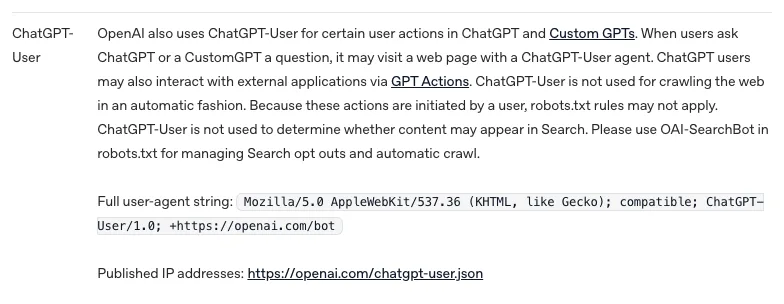
It cannot tell you what Google has indexed or shows for your page. Without search on, it only knows what you paste. With search on, it can open some pages, and OpenAI says ChatGPT-User may visit a page when a user asks.
It does not know today's results page
Without search on, it works from training and from what you paste. Prompt 3 asks you to paste the real top results for that reason.

5 checks before anything goes live
Check facts, titles, schema, intent and value before you publish.
- 1Facts: every number and name has a source you opened. Delete the rest.
- 2Titles: check each title says what the page is about. Our house rule is the keyword first. Google has no title length limit, but it cuts long titles to fit the device width and may change a title that does not reflect the page.
- 3Schema: paste the JSON-LD into Google's Rich Results Test (search.google.com/test/rich-results). The text in it must match the visible page.
- 4Intent: search the keyword yourself. Does your page answer what the top results answer?
- 5Value: would a reader learn something they cannot get from the top 3 pages? If not, do not publish.

Google says to review metadata too: titles, meta descriptions, structured data and image alt text can all show up in results. Read Google's page on using generative AI content and its title link guidance. OpenAI's bots page is the source for what ChatGPT-User does.
Do you need special work for AI answers?
No. Google says there are no extra requirements for AI Overviews or AI Mode.
“There are no additional requirements to appear in AI Overviews or AI Mode, nor other special optimizations necessary.”

Google's newer AI optimization guide(updated 2026-07-10) adds: “a site must be included in Search generative AI features in Search Console to be eligible for display in generative AI features on Google Search.” Check that setting before you look for tricks.

So ChatGPT does not unlock a secret method. It saves time on the same work. For the difference between ranking and being cited, read SEO vs GEO and how to get cited by ChatGPT.
When one-off prompts stop being enough
Prompts are a good start, but the manual work does not scale. The limit is the manual work: you paste, you check, you publish, and you repeat it. For tools that try to cover that, see SEO automation and agentic SEO. If your site is new, begin with getting your website on Google. If you use Claude, see Claude SEO skills.
Sources
All read on 21 October 2026.
- Google Search's guidance on using generative AI content on your website, Google Search Central, last updated 1 October 2026
- AI features and your website, Google Search Central, last updated 10 December 2025
- Optimizing your website for generative AI features on Google Search, Google Search Central, last updated 10 July 2026
- Influencing your title links in search results, Google Search Central, last updated 10 December 2025
- Overview of OpenAI Crawlers, OpenAI, https://developers.openai.com/api/docs/bots
- Rich Results Test, Google, search.google.com/test/rich-results
Questions
It can do the thinking and writing steps: grouping keywords, outlining pages, drafting titles. Your Search Console data and rankings only reach it if you paste them in. With search turned on it can open some web pages, but it does not publish or measure anything for you.
Not by itself. Google's spam policy targets many pages with no value for users, whatever tool made them. Quality of the page is what counts.
No, treat any volume it gives as made up. Volume comes from Search Console, Google Keyword Planner or a keyword tool. Use ChatGPT for grouping and wording only.
We cannot give a verdict. Google's own pages say the same SEO work still applies to its AI features. See the quote and the Search Console setting in the section on special work for AI answers above.
ChatGPT fits one-off tasks you review yourself. For a task you repeat every week, a chat means pasting your data in every time, so a tool that holds the data fits better.
More guides
- Claude SEO Skills: What They Are and a SKILL.md Example
- Claude Code SEO: Fix Your Site's SEO From the Repo
- Technical SEO Audit Checklist: 10 Checks, Free Tools
Turn your next topic into a useful page
Compass reads your website, helps you plan relevant topics and creates sourced article drafts. Review and approve the work, then send it to a connected CMS or export it.
Written by Michael Nefedov, founder of noetio. Updated 20 October 2026.