Claude Code SEO: a review-first workflow for fixing your site
By Michael Nefedov, noetio · Updated 20 October 2026
Claude Code SEO means using Claude Code on your website's repo to find and fix on-page and technical problems, then reviewing the result as a pull request before anything goes live.
Short answer
- Good for: titles and descriptions, canonicals, sitemap, schema, internal links in code you own.
- Not for: keyword choice, rankings or traffic. By default it cannot see Google.
- Safe flow: branch, plan mode, small change, diff review, preview, merge.
What Claude Code can do for SEO
It does code-side SEO jobs: metadata, canonicals, sitemap, schema and internal links.
| Job | What you can ask it to do |
|---|---|
| Metadata | Read the page templates and list missing or duplicate titles and descriptions. |
| Canonicals | List pages with a missing or wrong canonical in the code. |
| Sitemap and robots | Check that the files exist, list the right URLs and block nothing by mistake. |
| Schema | Generate JSON-LD from the data the page already has, and flag fields the data does not contain. |
| Internal links | Find pages nobody links to and suggest links with plain anchor text. |
The steps follow Anthropic's docs: see common workflows and permissions (read 21 October 2026).
A review-first workflow, step by step
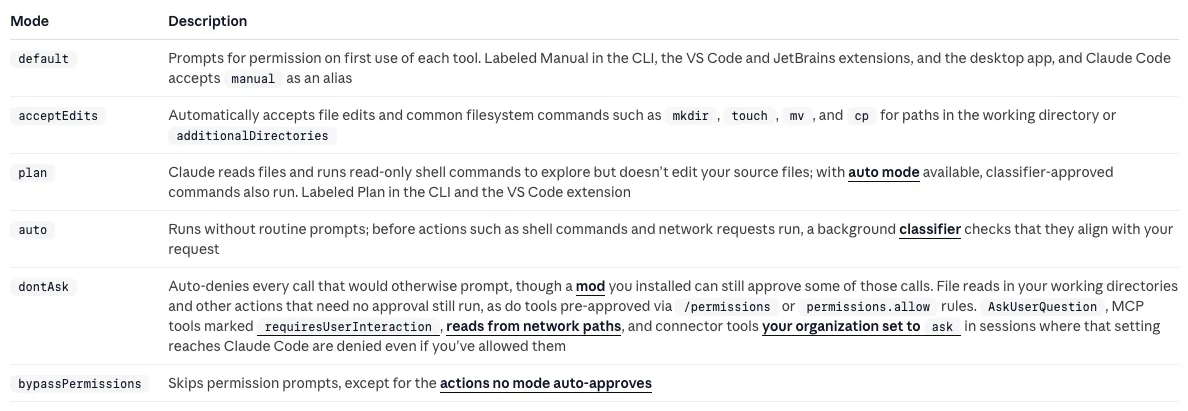
Work on a branch, plan first, and review every diff before you merge. In default (Manual) mode you approve each file edit. Modes such as acceptEdits and auto approve more for you.

- Make a branch. Keep SEO work off your main branch.
git switch -c seo-metadata-fixes
- Start in plan mode. Anthropic says Claude then reads files and proposes a plan but makes no edits until you approve.
claude --permission-mode plan
- Ask for a read-only audit first. Use prompt 1 below. Read the findings before you allow any edit.
- Approve one small change at a time. One kind of fix per pull request makes the diff easy to read.
- Review the diff yourself. Check every changed string. Anthropic also tells you to review the generated PR and ask Claude to point out risks.
- Open the preview. Check the page source of two or three pages with
curlor View Source. - Merge, then check Search Console. After deploy, use URL Inspection on an edited page.
Example prompts
Six prompts cover the common jobs, and the first four only read or propose.
1. Read-only audit
Audit the metadata of every page in this repo. Do not edit anything. Output a table: page path, title, title length, description, description length, canonical, and problems (missing, duplicate, or not matching the page). Quote the file and line for each row.
2. Fix titles with rules
Rewrite only the titles you flagged in your table. Rules: main keyword at the start, plain words, short. Use only facts already on the page. Show me the old and new title for each before editing.
3. Canonicals
Check that every page sets a self-referencing canonical URL on the final https domain. List pages where it is missing or points elsewhere. Propose the fix as a diff and wait for my OK.
4. Sitemap and robots
Read the sitemap file (for example app/sitemap.ts in Next.js) and robots.txt. Compare the sitemap with the list of public pages in the code. List pages missing from the sitemap, and pages in it that are noindex or redirect. Do not edit.
5. Schema
Add Article JSON-LD to the blog template, using the post's title, description, date and author already in the data. Do not add fields we do not have. Then show me how to validate it.
6. Internal links
List pages with zero internal links pointing to them. For each, suggest 2 pages that should link to it and the exact sentence where the link fits. Use only real routes from this repo.
What to know about each fix
Canonicals are a strong signal, sitemaps a weak one, and schema has no AI shortcut.
“A strong signal that the specified URL should become canonical.”

- Signals. Google calls
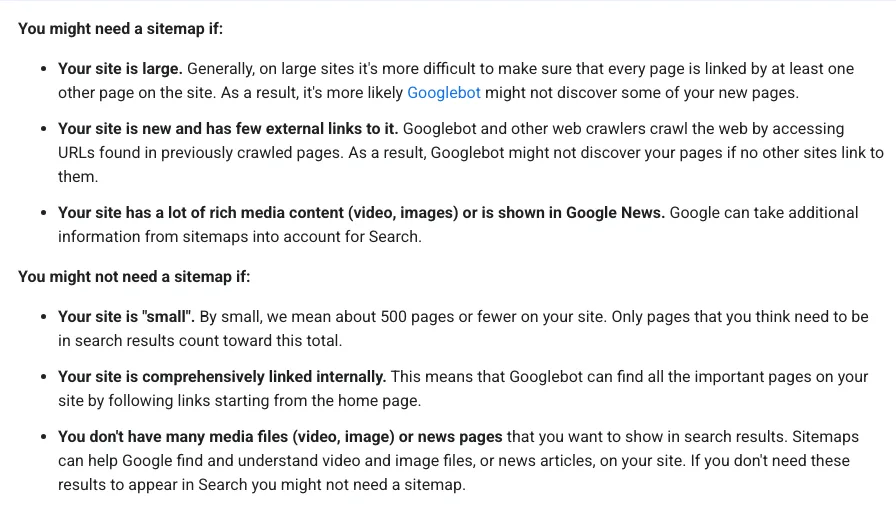
rel="canonical"and redirects strong signals, and a sitemap a weak one. It says not to use robots.txt for canonicalization. - Sitemaps. Google says you might not need one if your site has about 500 pages or fewer and is comprehensively linked internally. It lists cases where one helps, such as a new site with few external links (Google's sitemap overview).
- Schema. Google says there is no special structured data for AI features.

Give it real data
Code tells Claude what your pages say, not what people search for. By default it cannot see Google, so give it exported data or connect a tool. Export a Search Console performance report as a CSV, drop it in a folder outside your site code, and point Claude at it.
Read ../seo-data/queries.csv (Search Console export). List queries, highest impressions first, where the page's title does not contain the query words. For each, name the page and propose a new title. Do not change anything yet.
This keeps the facts (queries, impressions) from you, and the wording from Claude.
- Check that the columns you named match the file.
- Spot-check three rows against Search Console.
- Keep private data and secrets files out of the folder you point Claude at. Anthropic's permissions page describes deny rules for this.
What AI gets wrong here, and how to check
It invents facts, edits too widely and trusts code over the live page.
Invents metadata facts
Titles with claims the page does not make. Read every new string against the page.
Edits too widely
A sweeping rename can break routes. Keep diffs small and run your build and tests.
Trusts the code over reality
The code may say index while a header or CDN says noindex. Check the live page with curl -I.
Cannot see Google by default
Index status comes from Search Console, not from the code. Do not accept 'should be indexed'.
Framework details: Next.js SEO and Astro SEO. To make the audit repeatable, wrap prompt 1 in a skill: see Claude SEO skills. For the wider idea of an agent that opens PRs for you, read agentic SEO and SEO automation. For a manual audit, use the technical SEO audit checklist.
Sources
All read on 21 October 2026.
- Common workflows, Claude Code Docs, Anthropic
- Configure permissions, Claude Code Docs, Anthropic
- How to specify a canonical URL with rel="canonical" and other methods, Google Search Central, last updated 10 July 2026
- Learn about sitemaps, Google Search Central, last updated 10 December 2025
- AI features and your website, Google Search Central, last updated 10 December 2025
Questions
It is good at code-side SEO work: reading every page's metadata, finding duplicates, editing templates and writing a pull request. It does not see Google, rankings or traffic unless you give it exported data or connect a tool, for example through MCP.
You can start, but you must be able to judge a diff. If you cannot, ask a developer to review before you merge.
Not in the default mode. Anthropic's permissions page says acceptEdits accepts file edits automatically, and in auto mode a classifier reviews actions instead of you. Check which mode you are in before you start.
No. Google lists no special structured data for AI features. Add schema when it matches the page.
More guides
- ChatGPT for SEO: 9 Copy-Paste Prompts and 5 Checks
- Claude SEO Skills: What They Are and a SKILL.md Example
- Technical SEO Audit Checklist: 10 Checks, Free Tools
Turn your next topic into a useful page
Compass reads your website, helps you plan relevant topics and creates sourced article drafts. Review and approve the work, then send it to a connected CMS or export it.
Written by Michael Nefedov, founder of noetio. Updated 20 October 2026.