Claude SEO skills: what they are and how to write one
By Michael Nefedov, noetio · Updated 21 October 2026
Claude SEO skills are Agent Skills written for SEO work: a folder with a SKILL.md file that tells Claude how to do one task, like an audit, with the same steps each run.
Short answer
- A skill is a SKILL.md file with a name, a description and steps. Claude loads it when your request matches.
- In Claude Code, put it in .claude/skills/your-skill/SKILL.md in your repo, or in ~/.claude/skills for all projects.
- A skill is only instructions. It adds no data. Install only skills you have read.
What a Claude skill is
A skill is a folder with a SKILL.md file that gives Claude repeatable steps for one task.
“Skills are reusable, filesystem-based resources that give Claude domain-specific expertise: workflows, context, and best practices that turn a general-purpose agent into a specialist.”
Facts from Anthropic's Agent Skills overview and the Claude Code skills page (both read 21 October 2026). Each row links to its section:
| What the docs say | |
|---|---|
| Format | A directory with a required SKILL.md file, plus optional scripts and reference files. Overview, Skill structure. |
| Required fields (API and claude.ai) | name (max 64 characters, lowercase letters, numbers, hyphens, and no “anthropic” or “claude” in it) and description (max 1,024 characters). Overview, Skill structure. |
| How Claude picks it | Only name and description sit in context at start. The description is what Claude matches your request against. The body loads when the skill triggers. Overview, How Skills work. |
| Claude Code paths | ~/.claude/skills/<name>/SKILL.md (personal) or .claude/skills/<name>/SKILL.md (project, commit it for your team). Claude Code skills, Choose where skills load. |
| Run it by hand | Type /skill-name. Set disable-model-invocation: true and Claude does not start it on its own. The Claude Code docs say the description is then not in Claude's context either. Claude Code skills, Control who invokes a skill. |
| Network | Claude Code skills have the same network access as any program on your computer. Skills on the API have none. Overview, Runtime environment constraints. |
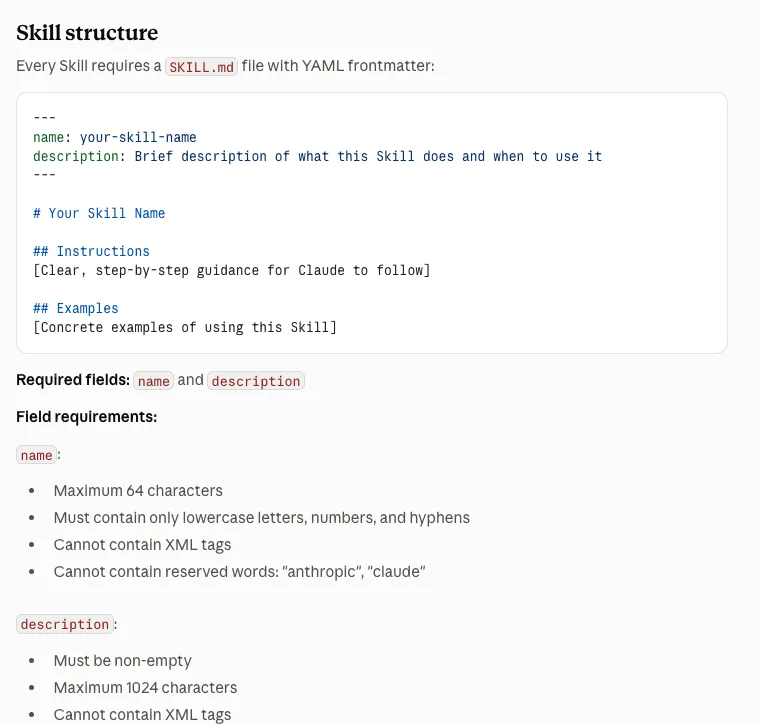
name and description. Source: Anthropic, Agent Skills overview, Skill structure, captured 21 October 2026. Open full size.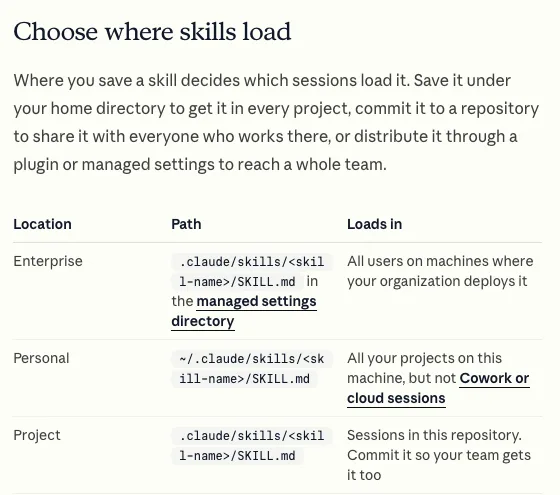
~/.claude/skills/, project skills in .claude/skills/. Source: Claude Code docs, Skills, captured 21 October 2026. Open full size.Set up an SEO audit skill
Four steps: make the folder, add SKILL.md, run the skill, read the report.
- Open your site's repo. Create the folder
.claude/skills/seo-audit-page/. - Create
SKILL.mdinside it with the text below. - Start Claude Code in the repo and run
/seo-audit-page /pricing. - Read the report. Ask for changes to the skill if it misses something.
The example asks for a read-only audit. Two settings matter:
allowed-toolslists the tools Claude can use without asking during this skill (Read, Grep and Glob). Anthropic's permissions page already lists file reads and Grep as needing no approval inside the working directory, so the line mostly states intent. The skills page says the grant lasts for the turn that runs the skill. Edits are not listed, so the normal permission prompts apply to them.disable-model-invocation: truemeans you run the skill by hand, and the description says how. To let Claude start it by itself, remove that line and write the description as “what it does, and when to use it”.
---
name: seo-audit-page
description: Audit one page of this site for on-page SEO problems and write a report. Run it by hand with /seo-audit-page followed by the page path.
argument-hint: "[page path, e.g. /pricing]"
disable-model-invocation: true
allowed-tools: Read Grep Glob
---

Audit the page at $ARGUMENTS in this repository. Read only. Do not edit files.

1. Find the file that renders the page and its metadata (title, description, canonical, robots).
2. Report these, quoting the exact line and file path for each:
   - Title: the text, and whether the main keyword is at the start.
   - Meta description: the text, and whether it matches the page.
   - One H1 only? Does it contain the main keyword?
   - Does the first paragraph answer the main question?
   - Canonical URL present and pointing to itself?
   - Any noindex or robots rule affecting this page?
   - Images without alt text.
   - Internal links in and out of the page that you can find in the code.
3. Mark each item PASS, FAIL or UNKNOWN. Use UNKNOWN when it cannot be seen in the code (for example live rankings, indexing, speed).
4. Do not invent keywords, volumes or rankings. Do not guess a main keyword: ask the user if it is not obvious.
5. End with the 3 most important fixes, in order.
Keep this example for Claude Code; it will fail on claude.ai.
- The field names above (
name,description,argument-hint,disable-model-invocation,allowed-tools, and$ARGUMENTS) come from the Claude Code skills page. - The docs say a skill uploaded to claude.ai fails with an error if its frontmatter has a field outside the spec. The error text in the docs names
argument-hint. disable-model-invocationis also not in the list of allowed fields (name, description, license, compatibility, metadata, allowed-tools).- Read the first report with care and adjust the steps.
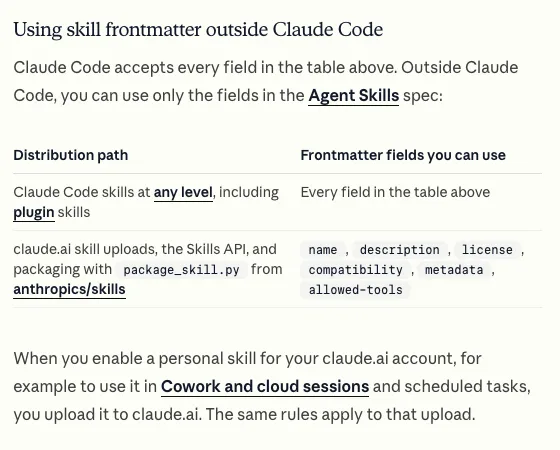
Unexpected key(s) in SKILL.md frontmatter: argument-hint. Source: Claude Code docs, Skills, captured 21 October 2026. Open full size.What to review by hand
Treat every skill result as a draft: check PASS, UNKNOWN, fixes and the skill itself.
Every PASS
Open the file yourself for one or two. If a rule in the skill is wrong, Claude will follow that wrong rule on every page it checks.
Every UNKNOWN
Check in Search Console: indexing, queries, clicks. A skill that reads code cannot see Google.
Any fix Claude proposes
Read the diff. Check that titles still say what the page says and that facts on the page are true.
The skill itself
Skills are code you run. Read every file in it, including scripts, before you use someone else's.
Skill, prompt or CLAUDE.md?
Use a prompt for one-off tasks, CLAUDE.md for standing facts, and a skill for repeatable tasks.
Prompt
One-off task. You type it each time. Fine for something you do once.
CLAUDE.md
Facts Claude should always know about the project, like brand rules and which folders hold pages.
Skill
A repeatable task with steps and a fixed output. Loads only when the description matches or you type /name.
Write a description that triggers
For a skill Claude can start by itself, the description is what Claude matches your request against. the overview says it must say both what the skill does and when to use it.
- Too vague: “helps with SEO”.
- Better: “Audit one page for on-page SEO problems. Use when the user asks to check a page”.
- If a skill never triggers, rewrite the description first.
- To control it, set
disable-model-invocation: trueand call it by name, as in the example above.
Skills on claude.ai
Skills you upload to claude.ai can show up in the terminal, but repo skills do not go to claude.ai by themselves.
- For claude.ai (not Claude Code), the overview says you upload a skill as a zip file in Settings, on Pro, Max, Team and Enterprise plans with code execution on. Those skills are individual to each user.
- The overview page says custom skills do not sync across surfaces (Cross-surface availability).
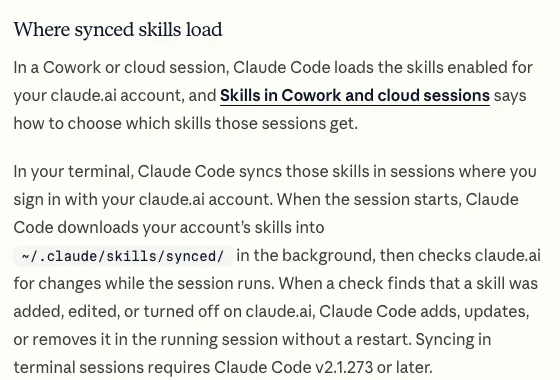
- The Claude Code skills page says Claude Code terminal sessions where you sign in with your claude.ai account download your claude.ai skills into
~/.claude/skills/synced/, from Claude Code v2.1.273.
Ideas for other SEO skills
Four small skills, each one task.
- 1title-meta-check: list all titles and descriptions in the repo and flag duplicates and missing ones.
- 2internal-links: list pages with no inbound links from other pages.
- 3schema-check: find JSON-LD and compare it to the visible page text.
- 4brief-writer: turn a keyword and pasted top results into an outline with a source for each fact.
Keep each skill to one task, so you can review it. For the repo workflow around it, read Claude Code SEO, and for framework-specific checks Next.js SEO. For one-off prompts without a repo, see ChatGPT for SEO, and for the bigger idea see agentic SEO.
Sources
All read on 21 October 2026.
- Anthropic, Agent Skills overview, platform.claude.com/docs/en/agents-and-tools/agent-skills/overview. Used for the format, field limits, loading levels, security advice, claude.ai upload and sync, network access.
- Anthropic, Extend Claude with skills (Claude Code), code.claude.com/docs/en/skills. Used for paths, frontmatter fields, bundled skills, synced skills (v2.1.273), upload errors.
- Anthropic, Configure permissions (Claude Code), code.claude.com/docs/en/permissions. Used for file reads and Grep needing no approval in the working directory.
- Anthropic, Commands (Claude Code), code.claude.com/docs/en/commands. Searched for an SEO skill: none listed.
Questions
They are Agent Skills, folders with a SKILL.md file, written for SEO tasks such as audits or title checks. The Anthropic pages we read list no SEO skill, so SEO skills come from people who write them. You can write your own, as the example above shows.
Not on its own. A skill gives Claude repeatable steps for files it can read, like your site code. It does not publish, measure or see Google.
Anthropic's Claude Code skills page says it includes bundled skills such as /doctor, /code-review, /batch, /debug, /loop and /claude-api. None of the bundled skills it names is an SEO skill.
Anthropic says to use Skills only from trusted sources, those you made yourself or got from Anthropic, and to audit every file in a skill from an unknown source before use.
Yes, with a catch: they do not sync both ways. Skills you upload to claude.ai can reach Claude Code, but repo skills do not reach claude.ai. The details are in the claude.ai paragraph above.
No. Rankings and clicks must come from a tool you connect, for example through MCP in Claude Code, or from a Search Console export.
More guides
- ChatGPT for SEO: 9 Copy-Paste Prompts and 5 Checks
- Claude Code SEO: Fix Your Site's SEO From the Repo
- Technical SEO Audit Checklist: 10 Checks, Free Tools
Turn your next topic into a useful page
Compass reads your website, helps you plan relevant topics and creates sourced article drafts. Review and approve the work, then send it to a connected CMS or export it.
Written by Michael Nefedov, founder of noetio. Updated 21 October 2026.